Introduction
In my search for a privacy respecting web analytics software that can also be selfthosted and installed via Docker, I quickly ended up with Plausible.
The self-hosted Community Edition is more than enough to cover my basic analytic requirement. But compared to other Docker Container that provide a one stop Docker Comose File without much server interaction, the Plausible Quick start seems quite complicated:
- Clone the repository
- Create and configure your environment file
- Expose Plausible server to the web with a compose override file
I did not want to interact with my server via CLI but manage it
all with Portainer via Stacks using a simple Docker Compose
file.
Since all other tutorials I could find never provided one working
Docker Comose File I figured it out myself which I want to provide
here.
Requirements
To get thinks started, there are some requirements to get Plausible working in my set-up.
- Docker & Portainer up and running
- Reverse Proxy installed. I use Nginx Proxy Manager
Configuration and Docker Compose File
I recommend to set-up the reverse proxy first. I run the Plausible container on a subdomain: https://analytics.your-domain.com. This subdomain points to port 1234, at which I can access the Plausible Docker installation.
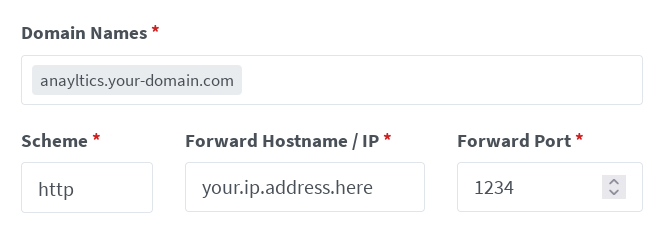
As a next step, I install the Plausible containers using Stacks in
Portainer using the following Docker Compose file.
Additional individual configuration requirements and enviroment
variables are indicated in orange.
services:
    plausible_db:
        image: postgres:14-alpine
        restart: always
        volumes:
        - /db-data:/var/lib/postgresql/data
        environment:
        - POSTGRES_PASSWORD=postgres

    plausible_events_db:
        image: clickhouse/clickhouse-server:23.3.7.5-alpine
        restart: always
        volumes:
        - /event-data:/var/lib/clickhouse
        - /event-logs:/var/log/clickhouse-server
        - /clickhouse/clickhouse-config.xml:/etc/clickhouse-server/config.d/logging.xml:ro
        - /clickhouse/clickhouse-user-config.xml:/etc/clickhouse-server/users.d/logging.xml:ro
        ulimits:
        nofile:
            soft: 262144
            hard: 262144

    plausible:
        image: plausible/analytics:latest
        restart: always
        command: sh -c "sleep 10 && /entrypoint.sh db createdb && /entrypoint.sh db migrate && /entrypoint.sh run"
        depends_on:
        - plausible_db
        - plausible_events_db
        ports:
        - 1234:8000
        environment:
        - BASE_URL=https://analytics.your-domain.com
        - SECRET_KEY_BASE=64 bit key
        - DISABLE_REGISTRATION=false

volumes:
    db-data:
        driver: local
    event-data:
        driver: local
    event-logs:
        driver: local
The port number 1234 must be adjusted to fit your server configuration.
The BASE_URL needs to point to your domain where you want to access your analytics. I run my site on philippbastian.de but my analytics runs on a subdomain on my other server. In this case the example is analytics.your-domain.com
The SECRET_KEY_BASE needs to be a 64bit key. I tried a shorter one and it did not work. This command gave me a suitabe key:
openssl rand -base64 48As the name implies DISABLE_REGISTRATION sets the paramters for registration. Run the first Stack without this environemnt variable and once you are registered add this variable and run it again to disable registration.
Finishing Up
Plausible should now be installed and running.
The first
set-up and the addition of the tracking script to your website is
well descibed in their
Documentation.